
Auction Relisting Research on Android: Build a VIN Timeline
Organize dated auction appearances on your phone, compare the evidence fairly, and keep current repair estimates separate from historical vehicle records.
Published by AutoEstimatePro LLC
A VIN can connect several auction appearances, but a sequence of listings is not a complete account of ownership, repairs, or vehicle condition. On Android, organize the evidence before using current photos for a preliminary AutoEstimatePro repair report. The key is to preserve which fact came from which source and when.
Create one research record for the vehicle
Start with the full VIN and compare it across the listing and any accessible vehicle or document identifiers. Record the auction, lot reference, source URL, and date for each appearance. Keep screenshots or files only where you are permitted to save and use them. If the VIN does not match, investigate the mismatch before treating the records as one timeline.
Use separate fields for listing date, sale date if verified, and the date you captured the evidence. Those dates describe different events. A page archived in October might describe a September listing. Label a result as sold only when the source supports that conclusion; a high bid or asking price does not by itself establish a completed transaction.
Use this evidence-log structure
- Identity: complete VIN, lot reference, and the evidence linking this appearance to the vehicle.
- Timing: event date, capture date, and any uncertainty about the sequence.
- Reported details: exact mileage value and label, damage description, seller statement, and sale status as stated.
- Photos: views available, views missing, and the source of each image set.
- Next question: which document, seller clarification, or inspection could resolve the uncertainty?
Preserve original labels such as an unavailable mileage status instead of converting them into a precise mileage claim. If two providers conflict, record both results and their dates. A neat spreadsheet is less useful than an honest record of a missing fact.
Compare the same view across appearances
Put the same corner, panel, wheel, or interior area side by side. Different lighting, camera distance, dirt, or an open panel can change the apparent condition without documenting a repair. Identify a visible change first, then ask what evidence explains it. Do not infer the quality of underlying work from a cleaner exterior photograph.
Keep old photos as historical context. A current estimate should use the latest suitable images and the correct vehicle details. If you mix an older damaged bumper photo with a later replacement cover, label the dates so the repair scope is not accidentally built from two different conditions.
Worked example: a replacement cover and a second listing
Suppose an earlier appearance shows a broken bumper cover and a later appearance shows an aligned replacement. The later listing has no close-ups of mounts, reinforcement, or nearby sensors. The defensible conclusion is that the visible exterior appearance changed. Whether the supporting work was completed correctly remains unverified.
Ask for records describing the work, the replacement parts, and any relevant inspection or calibration. Ask a qualified technician which areas need physical access or measurement. A second auction appearance does not establish fraud, a failed repair, or even a completed earlier sale. Your timeline should generate focused questions instead of accusations.
The preliminary phone report can organize today’s visible repair needs and possible related risks. Keep that report beside the history log, not in place of it. If the current photos look better but documentation remains incomplete, an attractive repair subtotal does not resolve the unanswered history question.
Check title evidence separately
NMVTIS consumer guidance describes title, brand, odometer, and certain salvage-related records. It also explains that reports have limitations and that additional information can exist in a state’s full title record. Obtain the relevant records through appropriate sources and read their scope. An auction-photo archive and an AI repair estimate are different evidence.
Source: NMVTIS consumer guidance and reporting limitations
Finish with a decision log
- Which appearances are confidently matched to the VIN?
- Which changes are visible and which are only claimed?
- Is the sale status verified, or is it still a bid or listing result?
- What remains unknown about title, identity, repair quality, or current condition?
- What evidence would make you revise the budget, seek inspection, or stop the purchase?
Date the research packet and keep the report version with its photo set. If new evidence arrives, add it rather than overwriting the earlier record. This makes your reasoning easier to review and prevents an older screenshot from being mistaken for the current vehicle condition.
Build an auction history checklist
Explore how auction history research works
Choose a report that answers the current decision
Once the timeline is organized, use the current VIN and selected camera or library photos in AutoEstimatePro. The free NHTSA-backed preview helps check the vehicle context, and recent VINs stored on the device help you return to a candidate. Choose Rebuild, Flip / Resell, or Part-Out for an auction investment analysis; choose Repair or Insurance for repair scope without the investment panels.
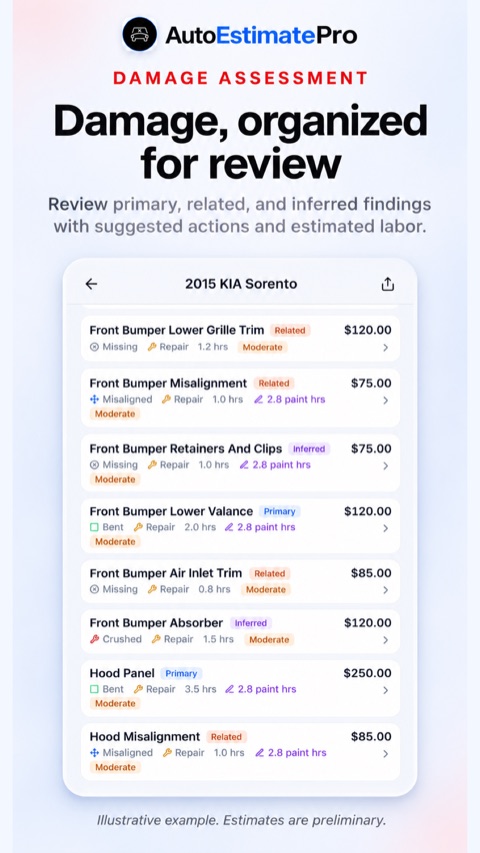
The damage section separates Primary, Related, and Inferred findings with severity and suggested actions. Expand a component for its available reasoning, repair guidance, and related videos. Compare the current parts, body labor, paint/refinish labor, and materials with the work described in the dated records. An editable hourly rate can update a budget assumption while the operation list stays visible for shop review.
Research a changed component without inventing its past
Suppose the newest photos show a different lamp or bumper. In Rebuild, Repair, or Insurance, report-linked parts sourcing can help you research candidates for work still needed. The separate AI Part Finder can help identify a currently fitted or loose component from one to three photographs, optional vehicle context, and ZIP code. Candidate names, possible OEM numbers, compatibility, condition notes, buying tips, and sources make the supplier conversation more specific.
Keep the two questions separate in your log: “What part appears to be here now?” and “What evidence shows who fitted it and when?” A suggested identification helps with the first. Invoices, inspection findings, and other records address the second. Part Finder is available to eligible paid accounts; check current access in the app. A replacement listing is a shopping lead, not evidence of a past repair.
Compare today’s value assumptions with the dated record
Auction-purpose reports can show as-is planning values, clean- and salvage-title after-repair estimates, and part-out ranges. Market examples and context may also be returned. Use those fields to frame today’s scenario without turning an old auction bid into a verified current resale comparison. The three report bid ceilings distinguish as-is flip, rebuild, and salvage strategies, and use a simplified 5% fee assumption.
For a specific purchase budget, the separate Max Bid tool accepts your repair, resale, transport, miscellaneous-cost, target-profit, and estimated or manual fee inputs. The transport calculator can use today’s origin and destination or manual miles. A vehicle’s earlier yard location belongs in the history log; it should not silently become the route for your present acquisition.
Share the current estimate with the right historical question
Saved Reports lets you revisit earlier estimates and generate a shareable web report link through the phone’s sharing options. Keep photo dates and source records in your own research packet so a reviewer understands which appearance the report addresses. You can ask the AI Auction Assistant to organize neutral seller questions from the dates and facts you paste in. Signed-in usage limits apply without consuming report credits; it does not retrieve live listings or verify history.
Explore the mobile tools for a current repair scenario
Use AutoEstimatePro on Android or iPhone
AutoEstimatePro LLC publishes this guide and the app. Choose the official Google Play or App Store download below. Downloading is free; reports and subscriptions require payment. Review current device compatibility, included features, and purchase terms in your store. Do not assume web, Apple, and Google Play purchases share the same entitlements.


Review the mobile repair-planning workflow